Copilot for Windows 11 gets improved file search and Copilot Vision
Copilot for Windows 11 gets improved file search and Copilot Vision
Microsoft has announced an important update for its Copilot app for Windows 11, introducing two useful features: improved file search and Copilot Vision.
The improved file search feature allows users to interact with Copilot using natural language queries, to find specific files quickly. The AI-powered tool will return relevant results from a wide range of file types including .docx, .xlsx, .pptx, .txt, .pdf, and .json formats. Improved file search is designed to be an intuitive and efficient way to manage files. Microsoft has outlined some example scenarios to highlight how the feature works. A user can ask Copilot things like "Open the trip planning doc I was working on last week," or “Can you find my resume”, and find what they wanted instantly.
Users can control the permissions for the files that Copilot can access, retrieve, or read, under the app's settings.
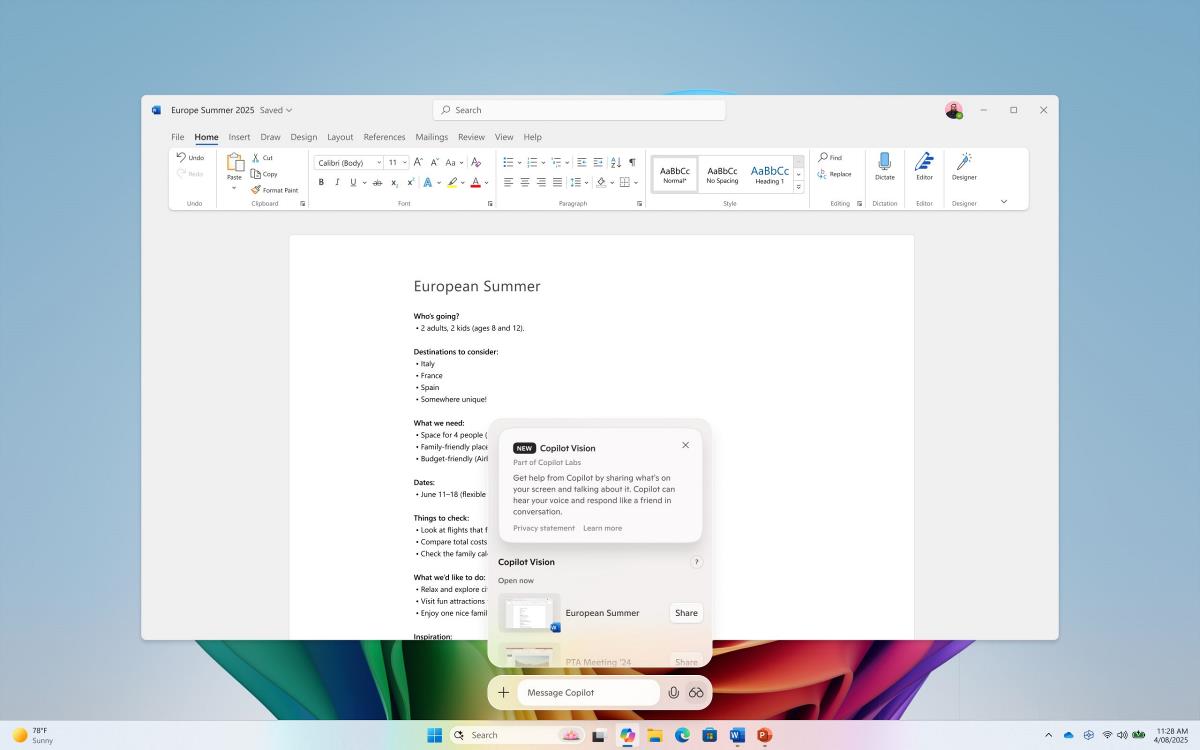
Another notable addition in the latest update is Copilot Vision, which allows users to share any application's window with Copilot. Once a window is shared, Copilot can analyze the content and provide contextual assistance and guidance. You can also interact with it to ask questions about the content that you shared, and Copilot will respond with relevant information. Windows Central writes that this feature was first introduced for Microsoft Edge but has now been expanded to include other applications, to broaden its utility.
Early feedback from testers who accessed the features are positive, improvements like these could help boost the adoption of Copilot as a digital assistant.
The new features are available in the Copilot app version 1.25034.133.0 and higher. Copilot Vision is currently rolling out to Windows Insiders in the U.S. Improved file search will roll out to insiders worldwide. To access Copilot Vision, click on the glasses icon in the Copilot app's composer, and select the window that you want it to analyze.
More like this
-
When will the cybersecurity company Okta ensure its own security?
 When will the cybersecurity company Okta ensure its own security?Read more
 -
PSA: Raivo OTP for iOS was acquired by Mobime a few months ago
PSA: Raivo OTP for iOS was acquired by Mobime a few months agoRead more
-
Nvidia updates its app with lots of improvements targeting display settings
Nvidia updates its app with lots of improvements targeting display settingsRead more
-
AI-Powered Search Explodes in Popularity, Challenging Google’s Dominance
AI-Powered Search Explodes in Popularity, Challenging Google’s DominanceRead more
-
Apple Seeds iOS 18.4 RC Ahead of Official Release in Early April
Apple Seeds iOS 18.4 RC Ahead of Official Release in Early AprilRead more