How to restore access to classic Notepad on Windows 11
How to restore access to classic Notepad on Windows 11
Microsoft replaced the classic Notepad text editor on Windows 11 with an advanced version featuring new features such as tabs and AI integrations. Not every Windows user likes the change. Some prefer the old snappy version of Notepad instead.
The problem: When you launch Notepad on Windows 11, for instance from the Start menu or runbox, the new Notepad application is launched.
What Microsoft does not tell you is that the classic Notepad application is still onboard. You can restore it with just a few basic steps, which I will outline below.
How to restore classic Notepad on Windows 11
Note: This methods works on all recent versions of Windows 11, including Windows 11, version 24H2.
Here are the steps:
- Open the Start menu.
- Select Settings to launch the Settings application.
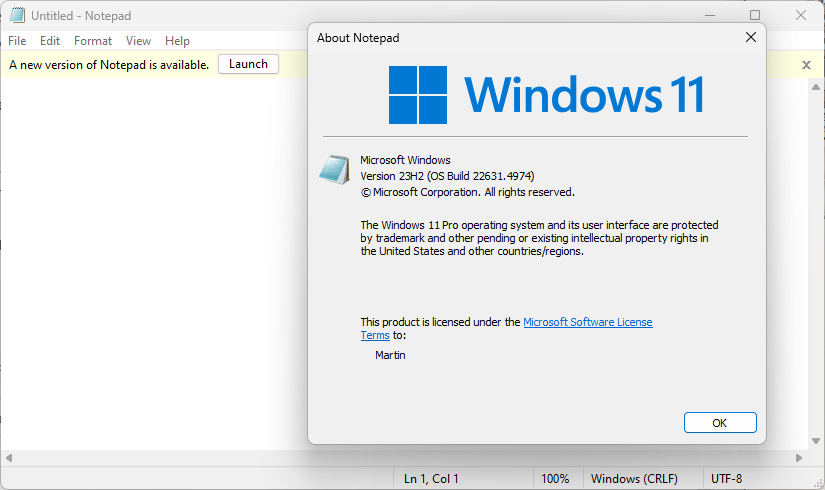
- Navigate to Apps > Advanced App settings > App execution aliases.
- Scroll down the list until you find Notepad.
- Toggle the alias to Off with a click.
This is all that is required. You can now launch classic Notepad again on the system. Try it out by launching the runbox with the shortcut Windows-R, typing notepad.exe, and pressing the Enter-key on the keyboard.
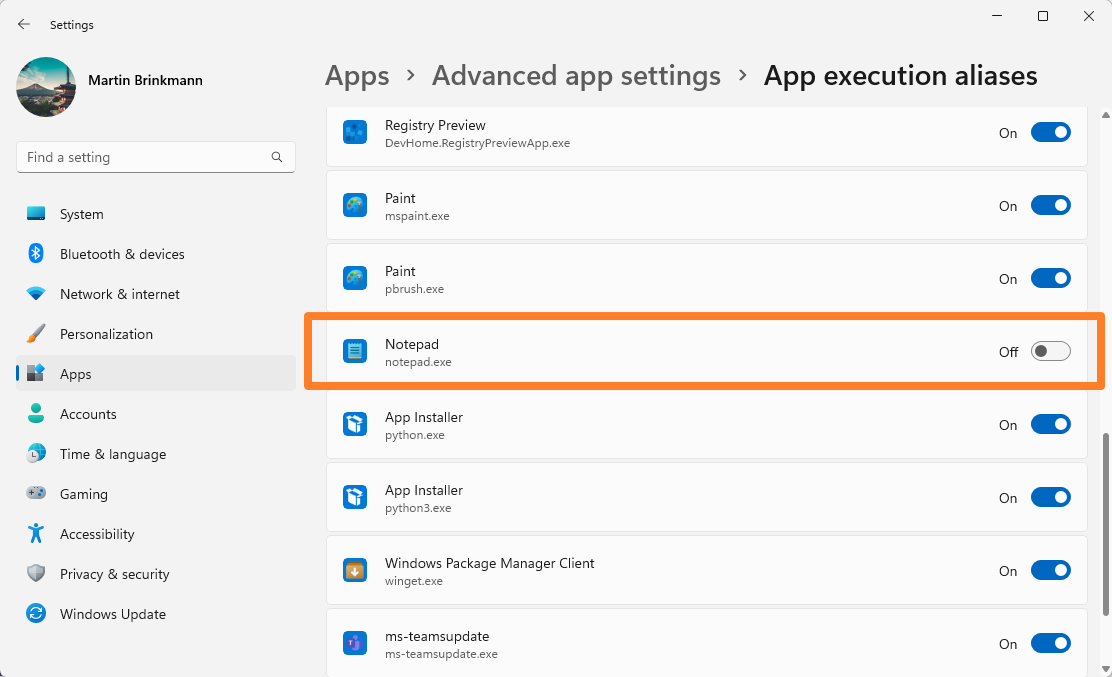
You should notice that the classic Notepad application is launched. A key indicator is that you get a "a new version of Notepad is available" notification at the top of the interface. A click on the close icon removes the notification.
Tip: right-click on the Notepad icon on the Windows taskbar and select the "pin to taskbar" option to quickly access it with a click on the permanent icon on the taskbar.
Note: you can still launch the new Notepad application. Just open the Start menu, type Notepad and press enter. This should launch the new application. You can use programs like O&O AppBuster to remove it, if you do not need it.
Did you know: you can also restore WordPad on Windows 11. The rich text editor was removed recently by Microsoft.
Closing Words
There is a good chance that Microsoft is removing the option in future versions of the Windows operating system. Until then at least, you can continue running the classic version of Notepad on your Windows PCs.
More like this
-
Google may delete (purchased) apps from your Android devices
 Google may delete (purchased) apps from your Android devicesRead more
 -
The Windows Security Updates of July 2024 are now available
The Windows Security Updates of July 2024 are now availableRead more
-
The revised Recall on Windows 11 is still recording information that it should not
The revised Recall on Windows 11 is still recording information that it should notRead more
-
OpenAI to Finalize First Custom AI Chip Design, Aiming for 2026 Production
OpenAI to Finalize First Custom AI Chip Design, Aiming for 2026 ProductionRead more
-
Apple’s Upcoming Display Might Use Mini-LED, But There’s a Catch
Apple’s Upcoming Display Might Use Mini-LED, But There’s a CatchRead more