Windows 11 is getting a native profile picture editor
Windows 11 is getting a native profile picture editor
Microsoft is working on integrating a new profile picture editor in its Windows 11 operating system. This editor helps users change and edit the profile icon of a user account.
The feature was introduced in Windows 11 build 26231, but it is disabled by default. Interested testers may enable it with the help of the ViVeTool.
Here, they need to run the command vivetool /enable /id:45189370,47364920 to enable the functionality.
Once done, the new option becomes available under Settings > Your Info.
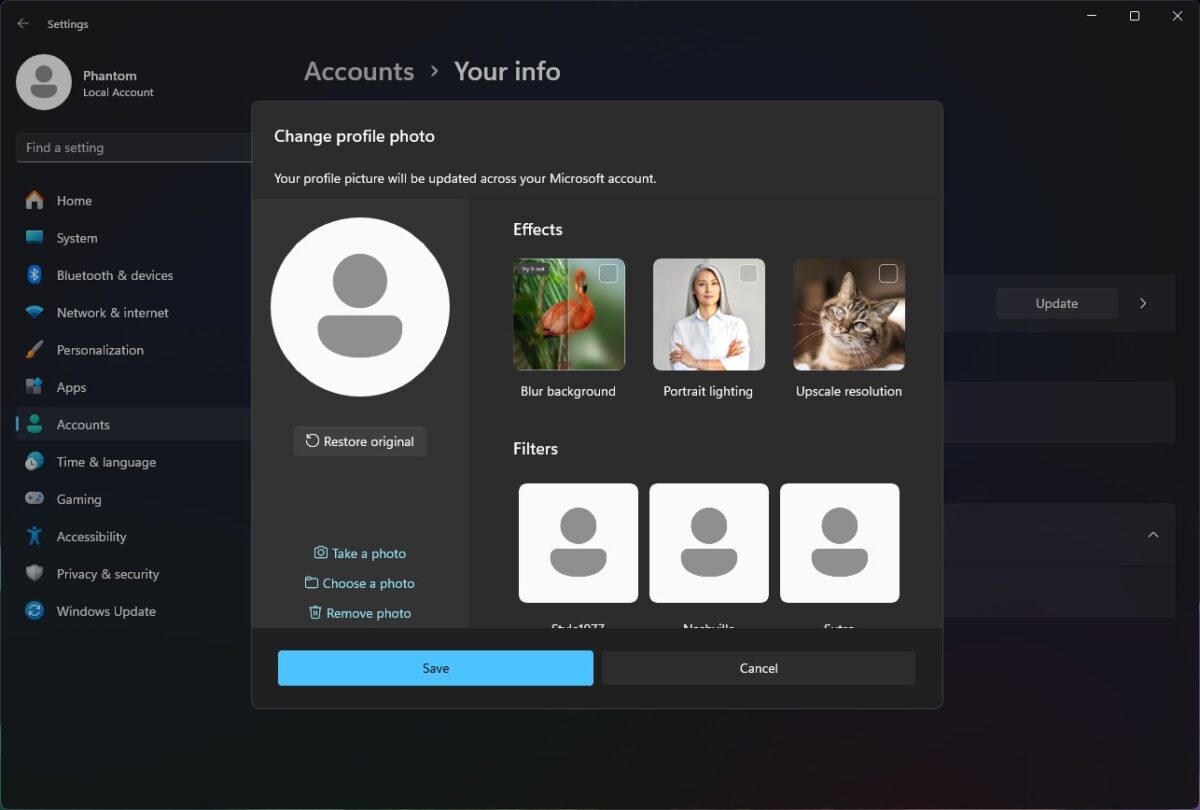
A click on "change profile photo" opens the editor. Users have the following options there:
- Take a photo using built-in cameras.
- Select an image from the local system.
- Remove a photo.
- Apply effects (blur background, portrait lighting, upscale resolution)
- Filters (apply filters).
- Apply Zoom.
- Rotate the image.
Our colleagues over at Deskmodder have enabled the functionality and revealed the names of the filters: Style1977, Nashville, Sutro, Walden, Xpro2 und AutoFocus. Not much to go by
The selected image is synced with the Microsoft account, if a Microsoft account is used. The functionality is also available for local accounts. It is unclear if images are uploaded for processing, or if the processing happens on the local device.
Microsoft refers to the feature as AIProfileImage. This indicates that some features, likely effects and filters, are applied using artificial intelligence. Microsoft makes no mention of this in the current dialog though.
Currently, users may go to Settings > Accounts > Your info to change the profile icon. The only provided options are to take a photo or to select an image from the local system.
The new feature adds editing options to the process, which require the use of third-party apps right now.
Closing Words
The new profile photo editor improves adding and changing the profile icon on Windows 11 devices. The editing options are the main improvements, as it may no longer be necessary to use a third-party app to apply effects or rotate the image.
All in all, it appears to be a useful change for the majority of Windows users.
Do you use profile photos on your systems, or do you keep the default icons?
More like this
-
Microsoft Edge: AI Browser is the browser's new name on Android and iOS
 Microsoft Edge: AI Browser is the browser's new name on Android and iOSRead more
 -
Google updates Chrome's Incognito Mode disclaimer to admit it is tracking users
Google updates Chrome's Incognito Mode disclaimer to admit it is tracking usersRead more
-
Syncthing for Android is being discontinued, but there's an alternative app you can switch to
Syncthing for Android is being discontinued, but there's an alternative app you can switch toRead more
-
Amazon Raises Music Unlimited Prices—Here’s How Much You’ll Pay Now
Amazon Raises Music Unlimited Prices—Here’s How Much You’ll Pay NowRead more
-
Katamari Damacy Rolling Live Launches Exclusively on Apple Arcade April 3
Katamari Damacy Rolling Live Launches Exclusively on Apple Arcade April 3Read more