Windows 11's Snipping Tool is getting a GIF creator
Windows 11's Snipping Tool is getting a GIF creator
Windows 11's Snipping Tool will soon let you create GIFs from your screen recordings. We reported about this last month, and here are some more details.
You may be aware that Snipping Tool lets you record videos and save them as .MP4 files. That's cool, but animated GIFs are more commonly used for sharing shorter content on social media, chat apps, etc. Animated GIFs are also useful for tutorials, as you can easily point out to readers what they have to do to enable/disable a feature, or teach them how to use something.
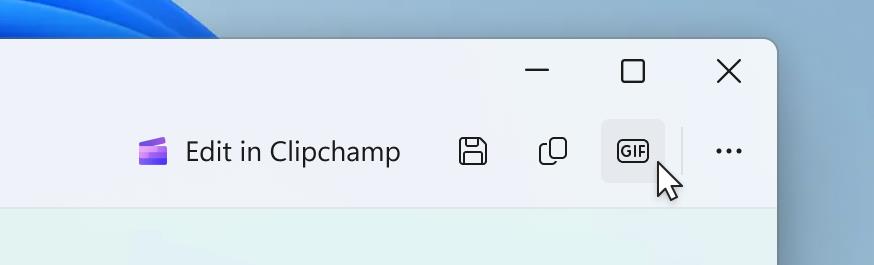
To start recording videos in the app, hit the Win + Shift + R keys. This will bring up the screen recorder, proceed as normal and start the video recording. When you stop recording, and the preview opens, Snipping Tool will display a button that is marked "GIF". This is the Export GIF tool. Click on it, and the app will ask you to select a preferred GIF quality. You have two choices: low and high quality.
This panel also displays the duration of the GIF in seconds, the resolution in pixels, and the number of frames per second. Users can choose to save the recording as a GIF file, or copy it to the clipboard.
Microsoft says that Snipping Tool's GIF export is limited to videos that are 30 seconds or less. If, however, your video is longer, it will offer to export the first 30 seconds of the video. That seems a little silly, I always felt it was a bit strange that Snipping Tool doesn't come with a basic image/video editor. Well, at least for once, it's not an AI-powered feature. Speaking of which, Microsoft is testing some AI features in Paint, Notepad and Snipping Tool.
Anyway, GIF export is available in Snipping Tool version 11.2505.21.0 for users who have enrolled into the Windows Insider Program's Canary or Dev Channels.
If you need a simple app that can record and create animated GIFs, and also edit them, take a look at ScreenToGIF. It's free, open source.
More like this
-
Windows 11 Development: overview of the November 2023 changes
 Windows 11 Development: overview of the November 2023 changesRead more
 -
Firefox Nightly for Android lets you install add-ons from files
Firefox Nightly for Android lets you install add-ons from filesRead more
-
Google is releasing previously Pixel-exclusive AI tools to all Google Photos users
Google is releasing previously Pixel-exclusive AI tools to all Google Photos usersRead more
-
ChatGPT integrates GPT-4o for more realistic and detailed image creation
ChatGPT integrates GPT-4o for more realistic and detailed image creationRead more
-
Nvidia could launch mobile variants of RTX 5050 and RTX 5060 within 2 weeks
Nvidia could launch mobile variants of RTX 5050 and RTX 5060 within 2 weeksRead more