Microsoft is testing Game Pass ads on the Settings homepage
Microsoft is testing Game Pass ads on the Settings homepage
Look, another advertising test in Windows 11. Microsoft launched a new build to the Windows 11 Insider Dev channel on Friday. Windows 11 build 26120.470 fixes issues for the most part. It is delivered via KB5037864 and rolled out gradually to all test systems, even if get the latest updates as soon as possible is checked.
Microsoft notes that the update "includes a small set of general improvements and fixes" designed to "improve the overall experience for Insiders".
Game Pass recommendation ad
One of the improvements recommends, Microsoft's words, the subscription service Game Pass.
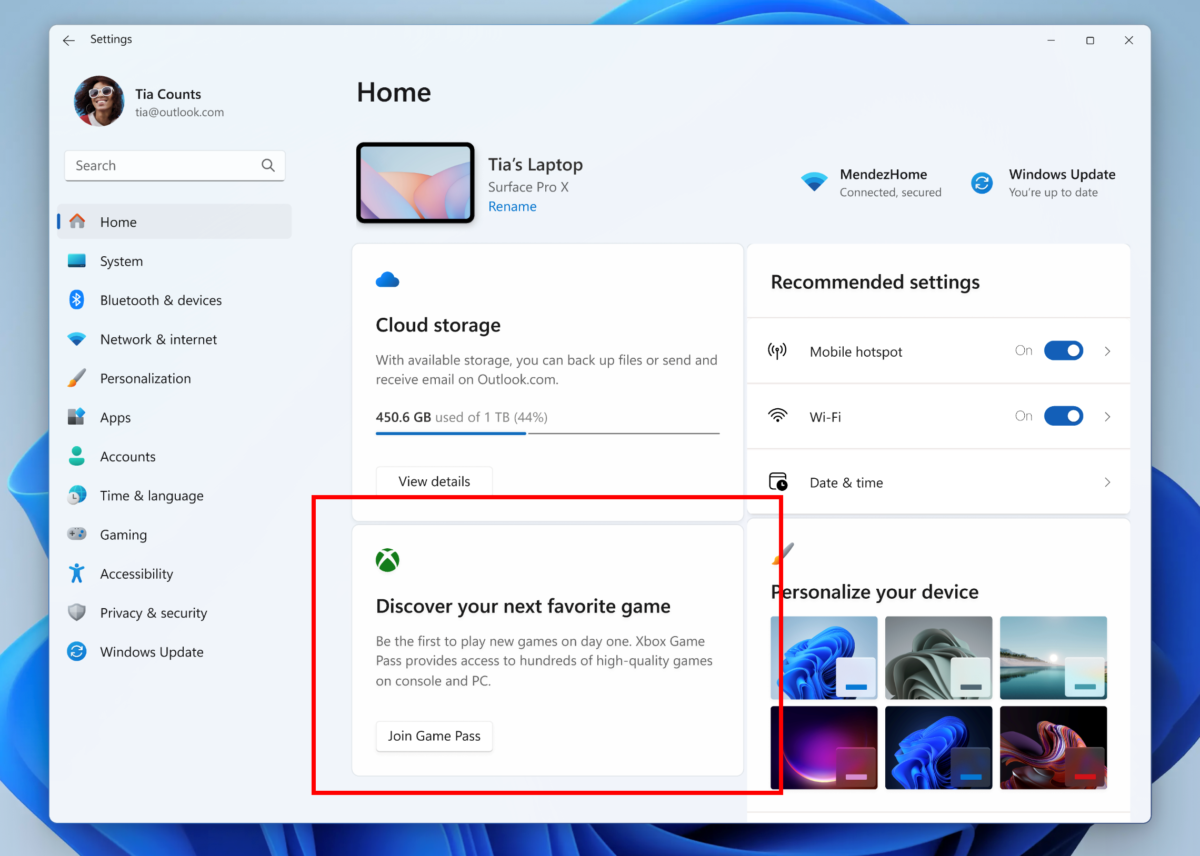
Windows 11 testers who open the homepage of the Settings app may see the new ad slot there. It advertises Game Pass, Microsoft's subscription-based game playing service.
Here is Microsoft's announcement: "We are introducing a new Game Pass recommendation card on the Settings homepage. The Game Pass recommendation card on Settings Homepage will be shown to you if you actively play games on your PC. As a reminder – the Settings homepage will be shown only on the Home and Pro editions of Windows 11 and if you’re signed into Windows with your Microsoft account.".
Game Pass is available for $9.99 per month, requires a Microsoft account, and gives subscribers access to hundreds of games while subscribed. There is also Game Pass Ultimate, which is available for $16.99 per month. The core difference is that ultimate gives access to games on PC, console, and the cloud, includes online console multiplayer, and includes EA Play.
Microsoft shows the Game Pass advertisement only if users are signed in to a Microsoft account and using Windows 11 Home or Pro. Whether this is true for managed devices as well is unclear.
Closing Words
When Microsoft launched the new homepage of the Settings app, I described it as half promotion half pointless. Not everyone agreed, which is fine.
Back then, Microsoft added a few promotions on the page already. It promoted Microsoft 365 there and also showed subscription information. I decided to hide the Windows 11 Settings homepage, as it offered no value.
Some users may find the information valuable enough to keep it enabled though. Microsoft continues to test the waters regarding ads on Windows 11.
Some, like application recommendations or profile icon recommendations have launched already. Good news is that you can turn off most ads, including app promotions in Windows 11's start menu.
What about you? Do you use the Settings homepage, if you use Windows 11?
More like this
-
Dell's Windows Copilot concept shows what Microsoft failed to deliver
 Dell's Windows Copilot concept shows what Microsoft failed to deliverRead more
 -
Microsoft starts rollout of Windows DMA compliance changes in Europe
Microsoft starts rollout of Windows DMA compliance changes in EuropeRead more
-
Windows 10 Support until 2030? 0Patch makes it possible
Windows 10 Support until 2030? 0Patch makes it possibleRead more
-
How to enable the Ultimate Performance plan in Windows 11
How to enable the Ultimate Performance plan in Windows 11Read more
-
Bitwarden to enable two-step login for all users in the next days, sort of
Bitwarden to enable two-step login for all users in the next days, sort ofRead more